Learning by doing has long been considered one of the best ways to retain information, and new visual interactive applications are providing an amazing opportunity for businesses to provide more compelling and memorable experiences. The debate regarding precise statistics, citations, and accuracy of the strata in the “learning pyramid” notwithstanding (see this recent blog post), it has become an axiom of cognitive learning theory that when a person is actively involved in the process and learns by doing, with hands-on experiences, they remember dramatically more. By capitalizing on this principle, trainers often attempt to increase knowledge retention by putting the user in the driver’s seat, to control their own learning experience.
Product manufacturers are leading the industry with innovative training tools, using 3D Product Models—virtual products that look and behave just like the real thing—to inform employees and customers alike about their offerings, without having the physical product present. The interactive 3D Product Models provide the most realistic user-driven experience possible, allowing the user to explore the digital content to clearly understand how the product works or functions.
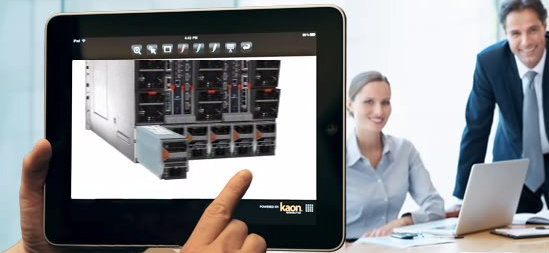
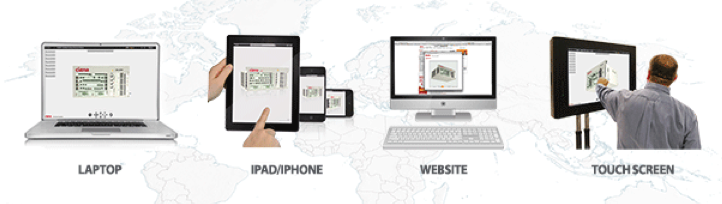
Many companies are using these 3D Product Models to improve the expertise of their internal sales, marketing and technical teams. The ability to quickly train internationally dispersed people gives organizations a huge advantage. For many companies, physical products (especially ones that are newly manufactured) aren’t always readily available for training and demonstrations, and are often the most difficult and expensive to obtain. This results in many employees not being well versed in the features, benefits and specifications of the company’s latest innovations, which is obviously detrimental in many ways. When virtual 3D Products are available, users can view them from every angle, explore options and features (open drawers, change batteries, add components, etc.), investigate internal workings and run animations showing processes. This allows employees in any corner of the globe to learn about and interact with any product as if it were physically in front of them – on a variety of convenient platforms, including websites, iPads, laptops or touch screen appliances.
Step-by-step process runs can teach operators exactly how to utilize a product from start to finish, with concise text messages complementing the visual 3D Product Model to better educating the user. Whether a user is an installation engineer interested in the number and location of power inputs or a technician learning how to run a particular function, the personalized nature of these interactive experiences lets each individual quickly investigate and learn about the aspects most relevant to them.
Interactive Training Experiences in Action
When Sizewise, a leading manufacturer of medical equipment ranging from cutting-edge medical beds, specialized mattresses, wheelchairs and other devices introduced their newest product, they needed a way to train internal teams on its innovative features. The Navigator hospital bed has a state-of-the-art software system integrated into the bed, and when it was first released there were almost no demo models available to train sales and customer support teams on how it functioned. So Sizewise turned to Kaon Interactive, the leader in interactive marketing applications, to create an interactive 3D Product Model of the bed—before the initial prototype was even released.
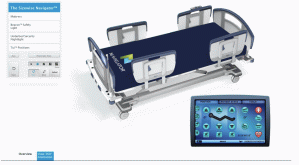 “From a technology and design standpoint, we’ve created a new-age hospital bed that the industry has never seen before and we wanted to effectively communicate the benefits to the healthcare community and make an impact at the product launch. With a global sales team of indirect and direct representatives, we needed a better way to educate our team internally about the complex and innovative product specifications prior to distribution,” said Mary Nell Westbrook, Chief Marketing Officer at Sizewise. “Kaon’s 3D Product Models are an interactive way to bring products to life. When we may not be able to have an actual demo bed in a hospital, users can experience the bed online with the Kaon model and get a far more in-depth feel for the product than they ever would from a brochure.”
Prior to the completion of the new product prototype, Sizewise was able to use the interactive 3D Product Model to train its sales team on the new product features and benefits. The 3D Product Model was able to demonstrate the bed’s functionality (bed controls, nurse indicators, patient stats, articulation to key positions such as ‘cardiac-chair position’ or CPR position, etc.)
This virtual product model had additional uses for Sizewise, as they were not only able to teach their internal teams—but also new prospects. When a Sizewise sales representative needs to teach a prospect how to use the product, they will access the virtual product demonstrations online, on a laptop, or via a downloadable iPad App. Through this user-driven experience, customers are more likely to retain key information, and internal employees can walk through virtual product demonstrations with customers remotely—as both have access to identical content.
Click here to experience the Sizewise 3D Product Model for yourself.
In Summary
When creating product training tools, be sure to capitalize on the increased engagement and knowledge retention associated with ‘learning by doing’. After driving their own learning experience, your trainee will walk away with a greater understanding of your offerings that they will remember longer. Also, make sure your tools can be used to educate not only internal teams, but customers and any other audiences you work with. There is no need to create unique training content for each individual audience base, and having a single unified training tool will ensure that no matter when or where an individual is being trained, they will receive a unique, effective experience.



 Kaon Interactive