Controlling Trade Show Costs

Trade-Show-Advisor.com recently wrote a blog post entitled “Know the 5 Trade Show Expenses You Can’t Control.” They went on to identify these five as:

  1. Freight that is Temporarily Missing
  2. That Lone Small Package
  3. Empties Never Show Up
  4.  The Lost Carpet Pad
  5. Extension Cords Aren’t Permitted

While it’s an interesting topic to think about the costs you can’t control, in today’s economic environment it’s vital to identify those that you can control.  Here are Kaon’s “Top 3 Trade Show Expenses You Can Control.”

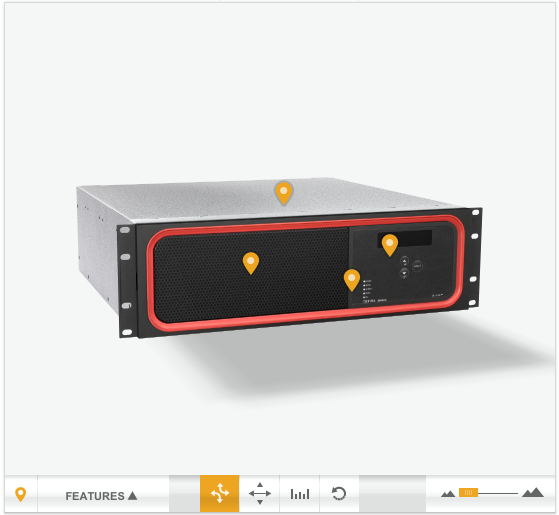
  1. Live Product Demonstrations Still Worth their Weight. Virtual meeting software (like GoToMeeting and WebEx) may suffice for discussions and presentations, but for companies who sell hardware products and complex solutions, prospects and customers want to see and experience the products they intend to purchase. There are two ways of doing this: 1.) pay for the shipping (and drayage, and power), or 2.) opt for a virtual interactive product model that act and behave the exact same as the real product – and actually enable more interactivity.
  2.  Do More with Less. Companies must continue to showcase their products well, while also providing sufficient staff to demonstrate how their products can address prospects’ business challenges. So how do you bring all products to every show? One way to accomplish this goal is to bring “virtual” 3D products on interactive touch-screens. Advanced, rich interactive marketing technologies allow companies to deliver dynamic, incredibly photorealistic experiences that let prospects interact with product models, thus eliminating the need to have every product physically present.
  3. Banish Brochures. For marketers looking for ways to cut costs, eliminating the printing of product brochures is an ideal place to start. As the competition grows increasingly more fierce, the need for being innovative and creating a sense of excitement surrounding your products is paramount; stagnant, one-dimensional brochures–even those containing the best creative efforts–don’t cut it today.

So how much can companies save by replacing reality with virtual reality?  One major telecom equipment company saves more than $404,000 per year in shipping and drayage costs alone.

So what modus operandi do you use for controlling costs?
Posted in Marketing Guru, Trade Show Trends | Tagged , , , , , , , | Leave a comment

Rethinking the 3D “Hot Spot”

One of the cool things you can do with a 3D product model is attach feature and benefit information bubbles to physical features of the product. We’ve been doing this since we started doing 3D product marketing on the web, using a technique I called the “Hot Spot.” (I’ve spent years trying to replace that name with something less jargonny, but I’ve been unsuccessful.) In a browser, you hover your mouse over the 3D places and information pops up. On a touch screen, you touch the hot spot with your finger to see the information.  In either case, we need to give the user a clue of where the information is hidden.

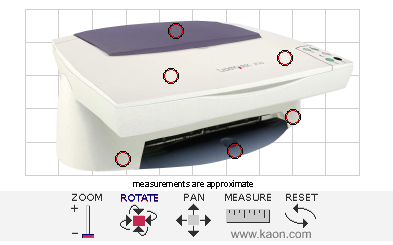
Hotspot Circa 2002

This is the earliest example I can find of a hotspot indicator. The center of each of those red circles is a place on the 3D model. When you hovered your mouse over that place, some information would pop up. We’ve always defined a hotspot as: object, x, y, z, radius. You need to have your mouse over the right object, and be within the radius (in 3D space) of the location. This approach has proved problematic:

  • Sometimes the customer wants to identify a bunch of features that are really close together, and so those “hover spheres” would overlap, causing multiple text bubbles to appear for a single mouse position (particularly when zoomed out).
  • The hotspot indicator covers up the feature you are talking about.
  • When you change your point of view, those spheres can get extremely small, and hard to get your mouse into. But the indicator stays the same size!
  • If we make the spheres bigger so they are easier to mouse over, they start to overlap, or poke through the back of the object.

Hotspot Circa 2003

The next step in the evolution of hotspots was to look at the problem of making them less hideous. After all, we made really beautiful photographic models, and then we’d put those ugly circles all over them. The treatment shown here lasted several years. The yellow dots would pulse on and off very subtly. This didn’t address the issue of overlapping or difficulty hovering small spots in 3D, of course.

The next step in the evolution was to go to an indicator which was hopefully a little more intuitive. This is what we came up with:

Hotspot Circa 2006

Note that this interface also includes an explicit control to turn the indicators on and off. Again, this is just aesthetic. We haven’t fixed the fundamental usability problem yet.

The “Aha!” moment for me came when we once again refreshed the look of our standard template. The hotspot indicator is now an upside-down teardrop:

Hotspot Circa 2010

Does that indicator shape look familiar? It’s very similar to the map position indicator in google maps. And this has led to a usability issue.

In google maps, you click on the indicator to get more information, but we were still expecting you to hover over the place that the indicator points to. If you hover over the indicator, you might be in the 3D hover sphere, or you might not, so it would sometimes show you the information, but not always. Very frustrating!

So here’s the “Aha!” moment: We should be using 3D position to indicate the position, and to decide whether to show an indicator at all (we don’t show them for things hidden away inside the object, until an animation brings them out into view). But we once we’ve placed the indicator on the screen, we should be using 2D mouse/touch position to trigger the information bubble.

It makes a huge difference – try it yourself! I’ve configured the demo page in that link to let you switch between the new 2D hover test, and the original 3D hover test. I think you’ll agree that this is a huge step forward in usability.

Posted in Geek Talk | Tagged , , , , , | Leave a comment

One Voice – Marketing and Sales

I never really believed the old saying that sales and marketing are like oil and water. I wanted to work in a utopian world where if everyone did their job to the best of their ability we would all get along and sing the same tune. I mean at the end of the day we’re all working towards the same corporate goals…RIGHT?

According to Stephanie Tilton’s “Can’t Sales and Marketing Just Get Along?” 56% of sales, marketing and channel management professionals surveyed report that their companies do not yet have any formal programs, systems or processes for unifying sales and marketing.

Finding ways to generate consistent and relevant content that meets our corporate objectives must be possible. So why does the gap still exist?

Posted in Marketing Guru | Tagged , , , , , , | Leave a comment